When sending a message using your local node the Ardor software must be running, then browse to http://127.0.0.1:27876/ and log in your account providing your passphrase. It is also possible connect to the testnet or to the testnet node of Jelurida to test this feature
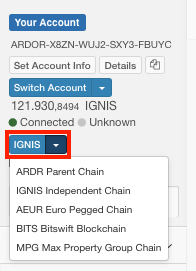
Select a chain that has the messages feature enable (ie: Ignis)
The "Messages" section and a "Send message" button on top will appear. Click on the "Send message" button and a modal will pop-up
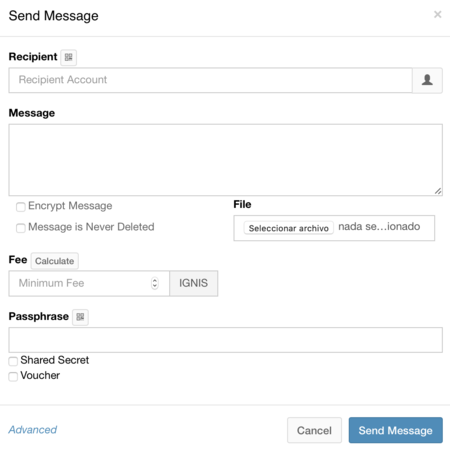
Complete the modal form shown below with the following entries:
Recipient: The account that will receive the message
Message: The message you would like to send (up to 1000 characters)
Note:: This message is encrypted by default, which means the recipient must know how to decrypt the message once they receive it. To submit the message as plain text, you must manually select this option. The “messaging” feature is simple and open-ended on purpose to allow other developers to create more advanced tools and applications.
Fee: Expressed in child chain tokens such as Ignis. Enter the fee you are willing to pay for this transaction. The minimum fee in child chain tokens must be equal to 0.01 ARDR (see Fee Structures).